
KYK Labs flagship product
Design your logistics floor,
validate it with simulation
TMCS-Lite is a logistics layout designer built by KYK Labs. Place AGVs, AMRs, OHTs and conveyors in 2D/3D, then run a simulation to see throughput and bottlenecks before you build — all in your browser, with nothing to install.
OHT ring · 4 vehicles
2D·3D
Layout editor
17
Ready-made simulation scenarios
KPI
Live throughput, utilization, bottlenecks
Multi-floor
Multi-level layouts linked by lifters
Product screens
Actual TMCS-Lite screens — see more on the product page
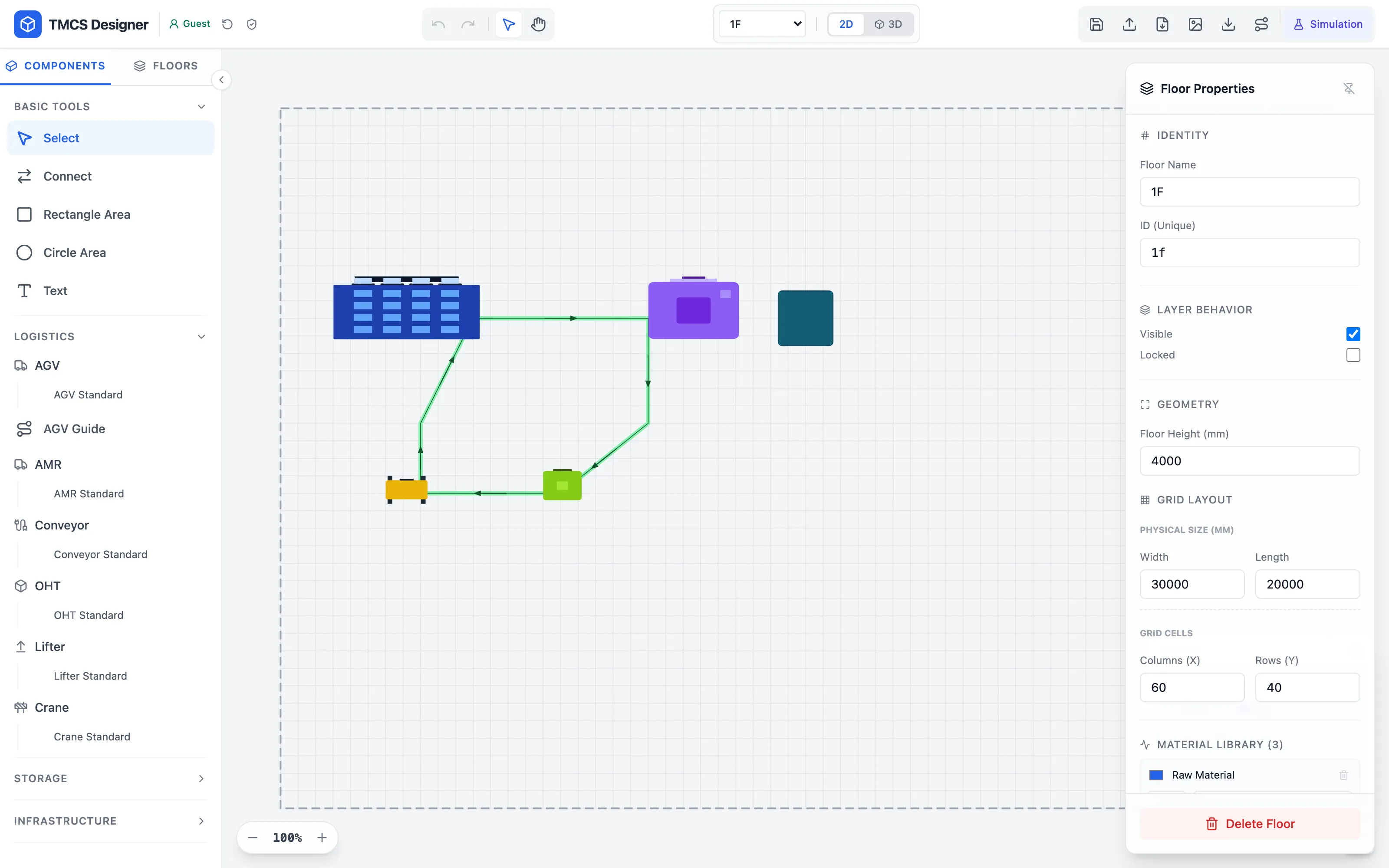
2D layout editor
Drag and drop equipment and transport routes
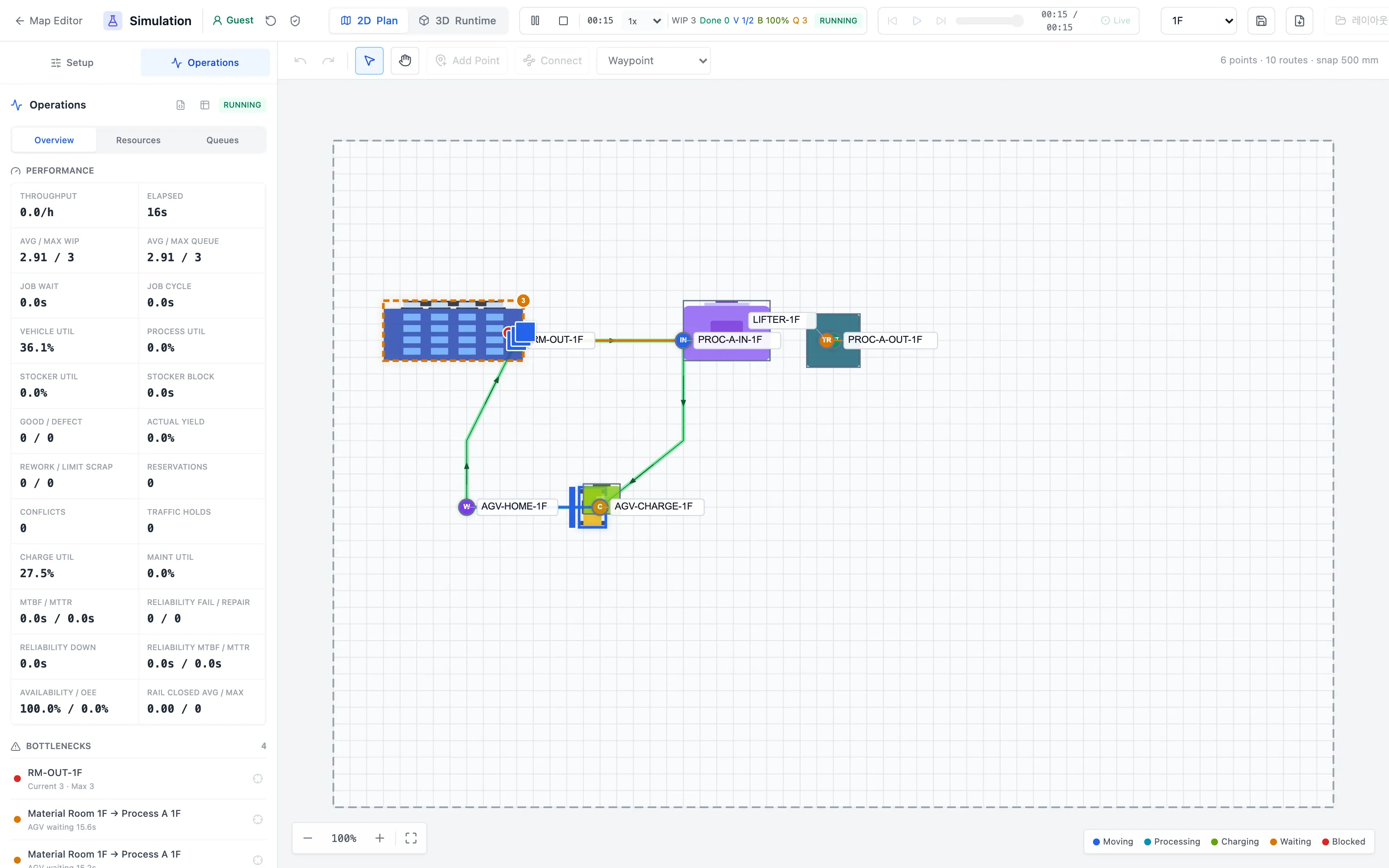
Simulation & operations KPIs
Throughput, utilization and bottlenecks from the first run
How do you validate a logistics layout today?
Three approaches used on the floor, compared
Installed expert simulator
General-purpose simulation suite
Precise, but heavy to get started
SetupInstall · license
LearningDedicated staff
ValidationSupported
- Strong at detailed analysis and statistical experiments across a plant
- Long track record and established references
- Desktop install with OS constraints and per-seat licensing
- Requires a dedicated engineer and training time
- Being general-purpose, transport logic such as AGV charging or OHT routing must be modeled from scratch
- Reviewing results together requires the same software on both sides
Best suited for
Large projects that analyze an entire plant in depth over a long period
Large projects that analyze an entire plant in depth over a long period
Drawings + manual review
Lay it out in CAD, judge from experience
Fast, but leaves no evidence
SetupImmediate
LearningLow
ValidationDifficult
- Start right away with familiar tools
- Good enough for checking placement and dimensions
- No way to know hourly throughput in advance
- Vehicle counts and travel paths are decided by intuition
- Bottlenecks only surface after the line goes live
- No objective evidence to compare alternatives
Best suited for
Early-stage reviews of rough placement and dimensions
Early-stage reviews of rough placement and dimensions
KYK Labs TMCS-Lite
Design it, validate it on the spot
Web-based design and simulation built for material handling
Start light, decide with numbers
SetupOpen a browser
Learning17 examples
ValidationInstant results
- Start in the browser — no installation, no license keys
- AGV, AMR, OHT, lifter, conveyor and crane are built-in components
- 2D layout → 3D view → simulation, all from a single model
- Throughput, utilization, WIP and bottlenecks aggregated as the run proceeds
- Fix the random seed to compare option A and B fairly
- Replay the timeline to revisit exactly where things went wrong
- Share read-only links · on-premises install for closed networks
Best suited for
Validating layouts and vehicle counts before you buy or expand handling equipment
Validating layouts and vehicle counts before you buy or expand handling equipment
※ This compares the general characteristics of each category of tool; individual products may differ.